3.3.4:How to Use ZPKG
1: What is zpkg?
zpkg is a secondary encapsulation of pkg (package) files, adding additional information to the base pkg file. as a standalone file. Developers can directly send zpkg files to end users or flash manufacturers via email or other channels. Except for the developer who packaged the file, no other members can view any data within it. This partially addresses specific requirements. zpkg supports the following features:
- (Feature Spotlight) zpkg files support password configuration: When a zpkg containing password information is loaded onto a device, the project file read back from the device requires password verification to open.
- (Feature Spotlight) zpkg files support read-back prohibition: Once read-back is disabled, project files cannot be retrieved from the device.
- (Feature Spotlight) zpkg files support binding to specific device machine codes: Once bound to a machine code, a zpkg can only be loaded once onto that specific device. Unauthorized devices or repeated loading attempts will fail,applicable to one-to-one scenarios.
- (On-demand) The zpkg file supports binding to device UUIDs (multiple devices can share the same UUID). After binding, only devices with matching UUIDs are permitted to load the file, which applies to many-to-many scenarios.
While zpkg may serve a purpose in certain specialized use cases, it still has limitations that require special attention. These are summarized as follows:
- Because passwords and project files are packaged together: This implies a certain risk of attack. PowerWriter® will do its utmost to prevent zpkg files from being compromised and leading to password leaks. Except for specific scenarios where the zpkg format is mandatory, we still recommend using pkg files + the ICWorkshop platform for project delivery in most common scenarios.
- Please be fully aware of the above limitations. If you are unsure, do not use this feature.
Modes such as binding zpkg files to authentication codes and binding device UUIDs are currently only supported by PWX1 devices. For device purchase links, please refer to the Mall Entrance in the upper-right corner of this page.
2: How do I save as a zpkg?
2.1: Project save config
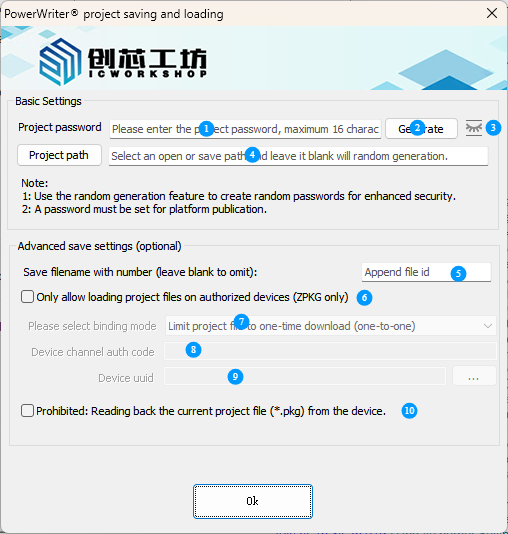
- Project File Password: Maximum length is 16 characters; no password is required if left blank.
- Random Generation: Click to generate a 16-character strong password randomly and automatically copy it to the system clipboard.
- Password Visibility Icon: Left-click to display the original password; release the click to hide it for anti-peeping protection.
- Project File Path: Set the path for saving or loading project files. If not configured, files will be cached in the system temporary directory with a random password and a random file name.
- File Numbering Settings: Automatically add a serial number at the beginning of the file name for saved files, in the format: xxxx_filename.pkg(zpkg).
- (ZPKG Project File Format Only) Load on Authenticated Devices Only: Once enabled, ZPKG project files will be bound via the device channel authentication code or device UUID. Successful authentication is mandatory for file loading.
- ZPKG Authentication Mode Selection: Two options are available: one-time download only (authentication code binding) and download restricted to specific devices (device identifier binding).
- Authentication Code Binding Mode: Bind via the device channel authentication code. Refer to Section 2.3 for details.
- Identifier Binding Mode: Bind via the device identifier. Refer to Section 2.4 for details.
- Disable Project Readback from Device: When enabled, direct readback of project files from the device is prohibited.
It is highly recommended to set a password for project files. Unprotected project files may lead to potential security risks.
2.2: Basic Usage
The method for saving zpkg files is identical to that for saving pkg files, as demonstrated in the animation below:

In the demonstration above, the project file is exported in ZPKG format (the PKG format offers identical functions), and the option to disable project readback from the device is enabled.
2.3: Machine Code Binding
Binding the zpkg to the machine code of a specific PowerWriter device enables single-download capability for zpkg. By displaying the programming count of the project file, it achieves offline delivery capability. PowerWriter devices support machine codes for 8 channels, as shown in the figure below:
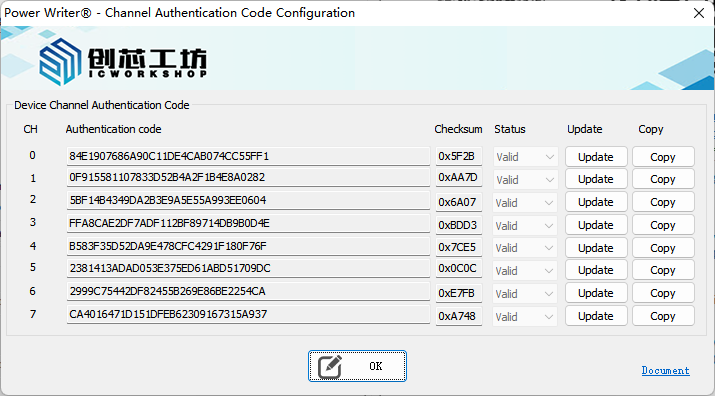
- Authentication Code: The machine authentication code (unique identifier) for PowerWriter devices. This code can only be generated through an update process, and the device will automatically generate the authentication code.
- Checksum: Verification information for channel data, displayed for reference only.
- Status: Indicates whether the current authentication code is valid. Only valid authentication codes can be copied and bound to a zpkg file. Invalid authentication codes bound to a zpkg file will fail to load.
- Update: Update the authentication code for the current channel.
- Copy: Copy the verification code to the clipboard.
2.3.1: Auth-Code Generation
Before generating an authentication code on the device, connect the device to the PowerWriter application software. Follow these steps:

After generating the authentication code, copy it to the clipboard and provide it to the zpkg publisher to bind the device to the zpkg file.
2.3.2: Auth-Code Binding
The zpkg project publisher binds the device authentication codes provided by users to zpkg. The procedure is as follows:

The zpkg file containing the device authentication code is sent back to the manufacturer for loading onto the device during production. The device permits loading only once; after loading is complete, the authentication code becomes invalid and the same zpkg file cannot be reloaded.
2.3.3: Device Identifier Binding (UUID)
Authentication code binding is valid for a single use only. Once the device receives the specified project file, the device-side authentication code will become invalid. This is applicable for one-to-one scenarios. In contrast, the UUID binding method is more flexible, allowing multiple zpkg project files to be bound to multiple devices simultaneously. Simply configure the same UUID for both the project files and the corresponding devices to enable a many-to-many usage scenario. For details on UUID generation and configuration, refer to the UUID section in: 4.1.2.4 Setting (S) .

3: How do I load a zpkg into the Writer?
The process of loading a zpkg file onto the programmer and the process of loading a pkg file onto the programmer are demonstrated in the animation below:

4: Additional Notes
- The zpkg file containing the binding authentication code typically also requires synchronized configuration of the offline programming count limit; otherwise, the intended count control effect cannot be achieved.
- When burning the zpkg file with the binding authentication code online using the factory mode:
- If the programming count limit is enabled, online programming in factory mode will be disabled, and only offline downloads will be permitted.
- If the programming count limit is not enabled, online programming in factory mode will verify the device's authentication code. Devices that fail verification will be unable to undergo online programming.