3.1.20:Automated machine
The current series of PowerWriter® programmers (excluding PWLINK2) all support programming for Kingtung brand machines.
PWLINK2 only supports in-circuit programming, and for machine programming, it is recommended to use PWX1.
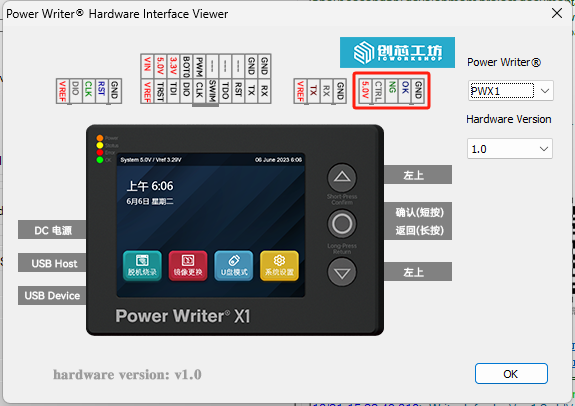
1.Signals of the PowerWriter®:
- CTRL: Controls the start of low-pulse programming, which requires the input of a low-pulse signal greater than 40ms and less than 1s to start offline programming once.
- OK: outputs high when the programming is successful, outputs 5V, and clears the state to low when there is a new operation.
- NG: Outputs high when the programming fails, outputs 5V, and clears the state to low when there is a new operation.
- Busy: When high, it indicates that the programmer is busy; the idle state is low. (Currently, only the PWX1 model exposes the Busy signal pin;For other programmer models, the BUSY signal does not need to be connected during production.)
- 5V: Machine interface power supply pin (please do not connect VREF).
- GND: Ground.
Both OK and NG output low at 0V for idle and busy states.
CTRL and key logic are the same, when starting the CTRL signal is equivalent to manually pressing a key, the programmer enters the busy state, and the OK and NG lamps will go out.
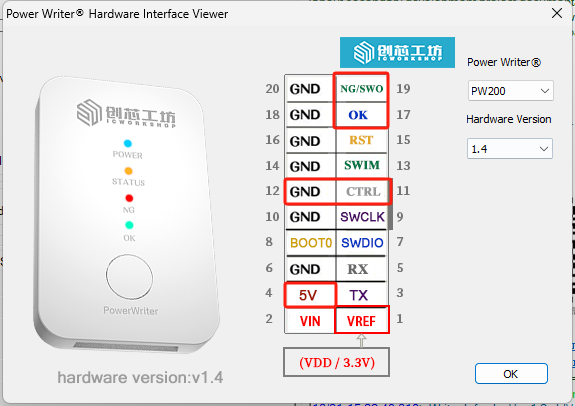
2.Signals of the Machine:
START: LOW(the same as CTRL)
OK:HIGH
NG:HIGH
BUSY:For the PWX1 programmer, set to high level; other products do not expose the BUSY signal pin, so set it to "X".
For other parameters on the machine, there are no special considerations. Set them according to the previous production requirements.
3.Connection
PowerWriter® to Machine:
CTRL--- START;OK---OK;NG---NG;BUSY---BUSY(Only the PWX1 requires this connection);GND---GND;5V---VDD(the power of machine)
PowerWriter® to MCU:
SWDIO---SWDIO;SWCLK---SWCLK;GND---GND;VREF---VDD(the power of MCU)
- PWLINK related series products do not have automated machine programming capabilities. If you need to use PWLINK for production, you can try to use in-line full-featured automated programming.
- For PWX1 devices, please check the interface signals, see PWX1 Machine Interface. (Same as PW200/PW300).