3.4.1.3: STM32U5x OEMKEY
1. Overview
Document Purpose
Explain how PW200, PW300, and PWX1 handle the writing of STM32U59x OEMKEY and RDP rollback.
1.1 Summary of Official Document Information
OEM1KEY and OEM2KEY cannot be set to all zeros.
Writing 0xFFFFFFFF clears OEMxLOCK:
- OEM1LOCK can be cleared when RDP level is 0.
- OEM2LOCK can be cleared when RDP level is 0 or RDP level 0.5.
When OEM1LOCK = 0, RDP level 1 is unconditionally allowed to roll back to RDP level 0.
When OEM2LOCK = 0:
- RDP level 1 is unconditionally allowed to roll back to RDP level 0.5.
- Rollback from RDP level 2 to RDP level 1 is permanently prohibited.
1.2 OEM1 RDP Lock Mechanism
Conditions for modifying OEM1KEY:
- RDP level 0.
- RDP level 0.5 or RDP level 1, and OEM1LOCK = 0.
Scenarios for using OEM1KEY:
- When rolling back from RDP level 1 to RDP level 0, OEM1LOCK = 1.
1.3 EM2 RDP Lock Mechanism
Conditions for modifying OEM2KEY:
- RDP level 0 or RDP level 0.5.
- RDP level 1, and OEM2LOCK = 0.
Scenarios for using OEM2KEY:
- When rolling back from RDP level 1 to RDP 0.5, OEM2KEY = 1.
- Authorize rollback from RDP level 2 to RDP 1.
1.4 Special Option Byte Modification Rules (Partial)
TZEN:
- Can only be set at RDP level 0.
- Can only be cleared when rolling back from RDP level 1 to RDP level 0.
UNLOCK:
- Can only be set to 1 when rolling back from RDP level 1 to RDP level 0 (actual test shows it can be modified directly after unlocking?).
2. Explanation of Programming Processing Mechanism
When selecting STM32U5 on the PowerWriter device, the following device interface will be displayed:
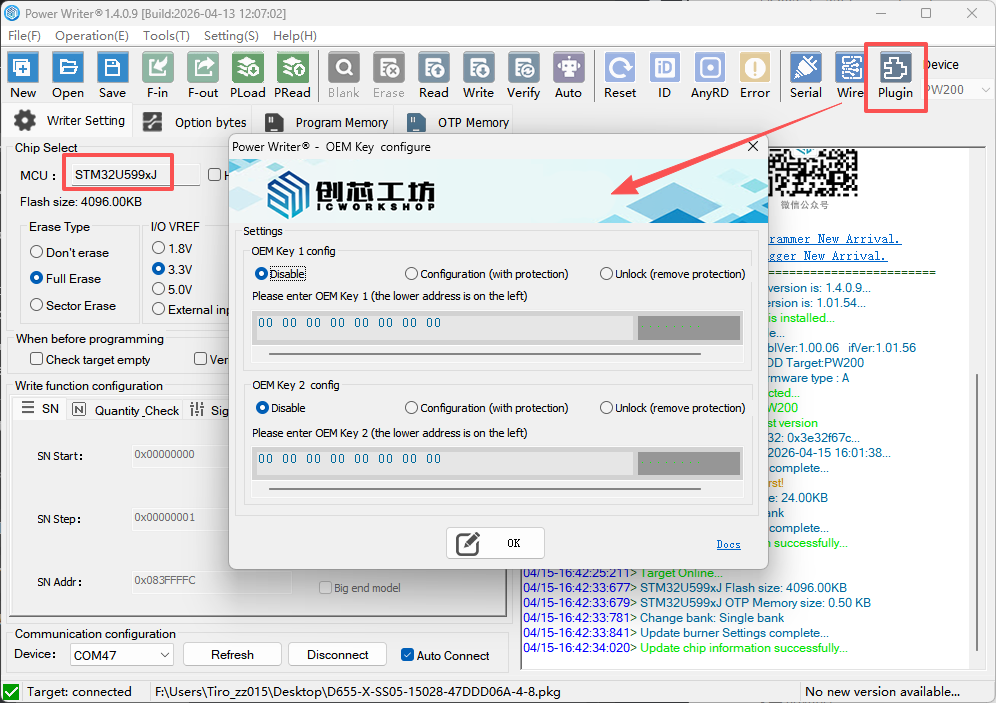
2.1 OEMKEY Writing (Offline, Online)
Note: OEMKEY writing is bound to option byte writing. Therefore, OEMKEY will not be written when [Option Byte Mode] is set to [No Operation => No Operation].
Writing Conditions
Before writing option bytes, obtain plug-in data and determine whether to write OEMKEY according to plug-in configuration, regardless of the value of the option bytes to be written.
When the OEM Key function setting in the extension is set to [Write (Add Protection, Configure)], write to the corresponding OEMKEY register. It should be noted that OEMKEY can only be written when the chip is currently at RDP Level 0. An error will be returned if the RDP Level does not meet the conditions.
2.2 RDP Level Rollback (Online)
Notes:
- The unlocking process is executed according to the extended configuration. Incorrect configuration will result in rollback failure.
2.2.1 OEM2KEY Unlocking and Rollback
- Processing Mechanism
When the chip is at RDP level 2, debugging connection is not possible, but IDCODE can be read.
Taking advantage of the above limitation, read RDP before writing option bytes, with a maximum of 3 consecutive reads. If all 3 reads fail, check whether IDCODE has been read. If IDCODE has been read and the RDP to be written is Level 1 (0xDC or 0xFF) or Level 0 (0xAA), execute the rollback process.
- Rollback from RDP level 2 to RDP level 1
Set the OEM key 2 function in the extension to [Unlock (Remove Protection, Rollback)] and enter the correct OEM key 2. Finally, set the RDP of the option bytes to Level 1 (0xDC or 0xFF) or Level 0 (0xAA), return to the option byte page and click [Write].
2.2.2 OEM1KEY Unlocking and Rollback
Processing Mechanism
Determine whether to execute the rollback process based on the current RDP value of the chip and the set target value. If password unlocking is required for rollback, the password is obtained from the extension. An error will be returned if the extension is not configured correctly.
Rollback from RDP level 1 to RDP level 0
Set the OEM key 1 function in the extension to [Unlock (Remove Protection, Rollback)] and enter the correct OEM key 1, then return to the option byte page and click [Write].
2.2.3 Rollback from RDP level 2 to RDP level 0
Processing Mechanism
The programmer supports rolling back from RDP level 2 to RDP level 0, which actually executes two RDP rollbacks automatically (RDP2->RDP1->RDP0).
Extended Configuration
Set the OEM key 1 function in the extension to [Unlock (Remove Protection, Rollback)] and enter the correct OEM key 1. Set the OEM key 2 function in the extension to [Unlock (Remove Protection, Rollback)] and enter the correct OEM key 2, then return to the option byte page and click [Write].
2.3 RDP Level Rollback (Offline)
Notes:
- The unlocking process is executed according to the extended configuration. Incorrect configuration will result in rollback failure.
2.3.1 OEM2KEY Unlocking and Rollback
When the chip is at RDP level 2, debugging connection is not possible.
Processing Mechanism
In offline mode, after pressing the programming button, the programmer will execute the rollback process if multiple access attempts fail.
Rollback from RDP level 2 to RDP level 1
Set the OEM key 2 function in the extension to [Unlock (Remove Protection, Rollback)] and enter the correct OEM key 2. Finally, set the RDP of the option bytes to Level 1 (0xDC or 0xFF) or Level 0 (0xAA), load the offline file to the programmer, and press the button to start offline programming.
2.3.2 OEM1KEY Unlocking and Rollback
Processing Mechanism
Determine whether to execute the rollback process based on the current RDP value of the chip and the set target value. If password unlocking is required for rollback, the password is obtained from the extension. An error will be returned if the extension is not configured correctly.
Rollback from RDP level 1 to RDP level 0
Set the OEM key 1 function in the extension to [Unlock (Remove Protection, Rollback)] and enter the correct OEM key 1, load the offline file to the programmer, and press the button to start offline programming.
2.3.3 Rollback from RDP level 2 to RDP level 0
Processing Mechanism
The programmer supports rolling back from RDP level 2 to RDP level 0, which actually executes two RDP rollbacks automatically (RDP2->RDP1->RDP0).
Extended Configuration
Set the OEM key 1 function in the extension to [Unlock (Remove Protection, Rollback)] and enter the correct OEM key 1. Set the OEM key 2 function in the extension to [Unlock (Remove Protection, Rollback)] and enter the correct OEM key 2, load the offline file to the programmer, and press the button to start offline programming.
3. Operations Supported by PW200, PW300, and PWX1
The programmer does not support arbitrary switching of RDP levels.
TZEN = 0

Note: Rolling back from RDP Level 2 to RDP Level 0 requires correct configuration of OEM1KEY and OEM2KEY, and selection of [Unlock (Remove Protection, Rollback)].
TZEN = 1

Notes:
- Rolling back from RDP Level 2 to RDP Level 0 requires correct configuration of OEM1KEY and OEM2KEY, and selection of [Unlock (Remove Protection, Rollback)].
- When TZEN = 1 and RDP level != 0, debugging permissions are restricted, and it is highly likely that the chip cannot be connected normally. Please try to connect after starting from the system bootloader. Even if connected, security-related option bytes such as SECBOOTADDR and SECWMx may still read incorrect values.
- Connect the NRST pin of the chip to the RST pin of the programmer.
- Improper use of non-standard processes may lead to unknown issues.