3.4.1.4: STM32C5 OEMKEY
1. Summary of Official Document Information
- For chips that have not been set with an OEMKEY, upgrading their RDP level to RDP Level 2 with boundary scan or RDP Level 2 cannot be rolled back to RDP Level 0.
- The OEMKEY cannot be set to all 00s or all FFs.
- Once the OEMKEY is written, it cannot be erased and can only be modified.
2. Description of Programming Processing Mechanism
When selecting STM32C5 on the PowerWriter device, the following device interface will be displayed:
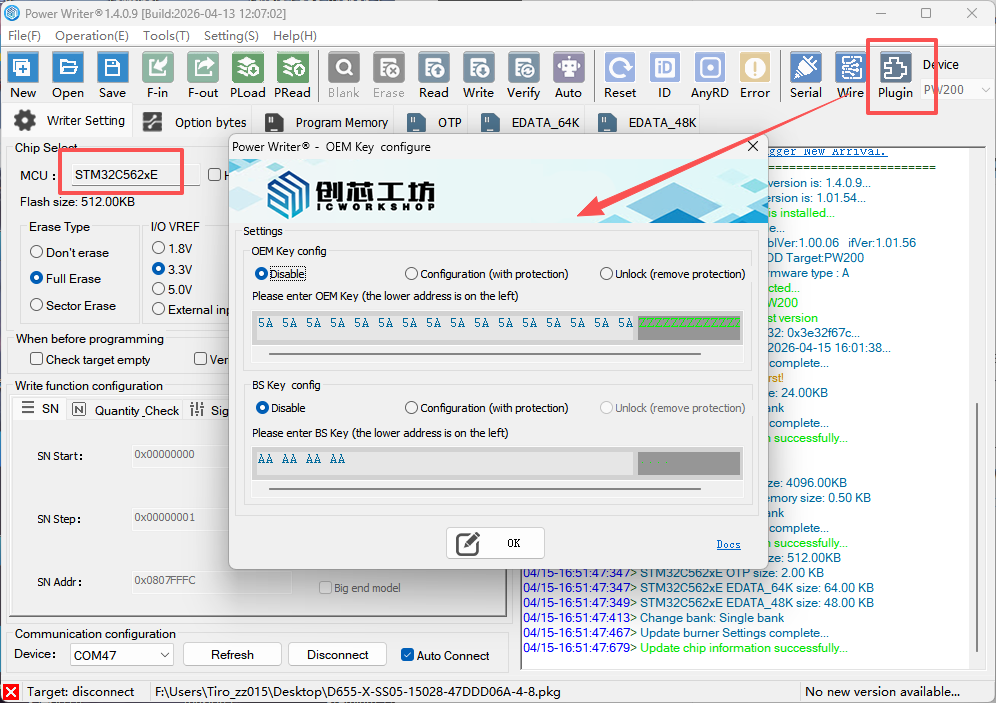
- Writing Conditions
The writing of OEMKEY is bound to the writing of option bytes. Therefore, when the [Option Byte Mode] is set to [No Operation => No Operation], the OEMKEY will not be written.
Before writing the option bytes, the programmer determines whether to write the OEMKEY according to the RDP LEVEL to be written. If the RDP LEVEL to be written is not RDP Level 0 (0xED), the OEMKEY will be written.
Only when all the above conditions are met will the OEMKEY writing process be executed.
OEMKEY Data Acquisition
When the RDP LEVEL to be written meets the above conditions, the programmer obtains the OEMKEY data from the extension and writes it into the OEMKEYR register.
In addition, if the above OEMKEY writing conditions are met but the [OEM key Function Setting] in the extension is not [Write (Add Protection, Configuration)], the programmer will use 0x5A5A5A5A, 0x5A5A5A5A, 0x5A5A5A5A, 0x5A5A5A5A as the default OEMKEY to write into the OEMKEYR register (please note this if you need to upgrade the RDP level but do not want to set a password!).
2.2 BSKEY Writing (Offline, Online)
- Writing Conditions
- The writing of BSKEY is bound to the writing of option bytes. Therefore, when the [Option Byte Mode] is set to [No Operation => No Operation], the BSKEY will not be written. However, the writing of BSKEY is not restricted by the RDP LEVEL.
- When the [BS key Function Setting] in the extension is [Write (Add Protection, Configuration)], the programmer obtains the BS key data and writes it into the BSKEYR register.
Note: According to the official ST description, the BSkey has a default value of 0xAAAAAAAA. Therefore, when the [BS key Function Setting] in the extension is not [Write (Add Protection, Configuration)], the programmer will not operate the BSKEYR register.
2.3 RDP Level Rollback (Offline)
When the RDP level is non-0, debugging cannot be accessed through AP1.
In offline mode, after pressing the programming button, if the programmer fails to access multiple times, it will execute the RDP Level rollback process. At this time, if the [OEM key Function Setting] in the extension is [Unlock (Remove Protection, Rollback)], the programmer will use the OEMKEY in the extension to perform the rollback; otherwise, the programmer will use 0x5A5A5A5A, 0x5A5A5A5A, 0x5A5A5A5A, 0x5A5A5A5A to perform the rollback.
2.4 RDP Level Rollback (Online)
When the RDP level is non-0, debugging cannot be accessed through AP1.
Rollback Conditions
When the RDP LEVEL to be written is RDP Level 0 (0xED), the RDP Level rollback is executed.
In online mode, when the above rollback conditions are met, if the [OEM key Function Setting] in the extension is [Unlock (Remove Protection, Rollback)], the programmer will use the OEMKEY in the extension to perform the rollback; otherwise, the programmer will use 0x5A5A5A5A, 0x5A5A5A5A, 0x5A5A5A5A, 0x5A5A5A5A to perform the rollback.
- Since rollback requires controlling the chip's RST pin, the programmer's NRST must be connected to the chip's RST pin when using the rollback function.
- The programmer does not support the transition operation from RDP Level 2 with boundary scan to RDP Level 2 for the time being.
- In offline mode, if the extension is configured for unlocking and the option byte mode is x=>User Settings, and the option byte RDP LEVEL is set to a value other than RDP level 0, the chip will be written with the default OEMKEY value and protected again after being unlocked. It is recommended to restore the option bytes to default when unlocking.